WebGPU 2D Maxwell Light Simulation Demo

Here’s a new demo that is an implementation of a 2D FDTD simulation of the Maxwell equations to simulate light. It can generate caustics and wavelength dependent effects easily by simulating the light as waves instead of rays. Unfortunately, this approach is not really suitable for any rendering applications due to the small scale of light waves, but it still serves as an educational tool.
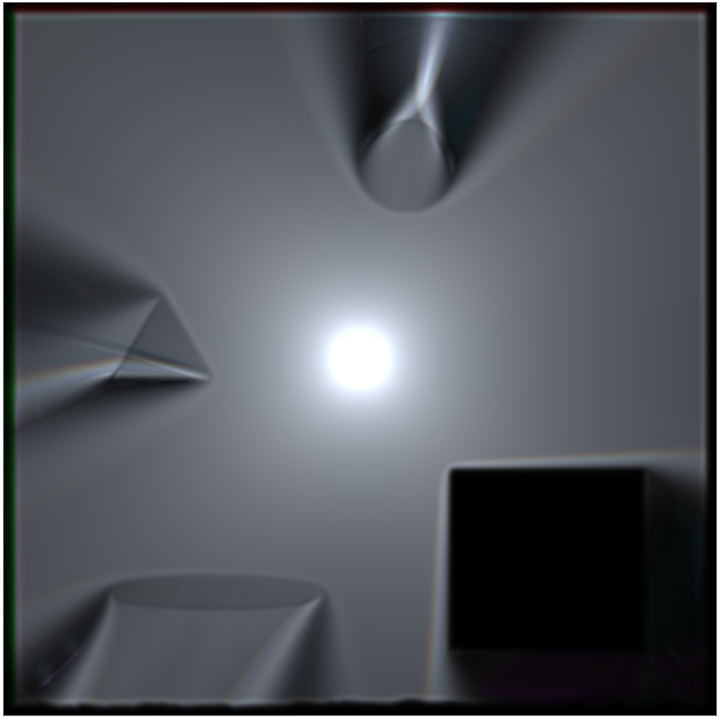
Click here for the demo

The demo simulates a single light impulse for three wavelengths representing red, green and blue. Parameters like permitivity and conductivity can be set with textures. The simulation is physically not fully accurate, some hacks were used to get desired result.

The demo uses a Yee-style grid and computes the electric and magnetic field in WebGPU compute shaders. First, one compute shader calculates the magnetic field from the electric field of the previous simulation step, then another compute shader calculates the electric field from the magnetic field that was just updated. A light source is created by exciting the electric field with a sine-wave impulse.

To render the results, the maximum of the squared electric field value is calculated for each wavelength and then stored in a texture which is displayed directly with just some gamma correction.

With a left mouse click you can position the light source and there are also UI elements to change the scene, set the visualisation mode and the simulation speed.

I actually had this as an OpenGL demo many years ago that I didn’t release. For that I used a fluid-wave simulation and that also worked, even in 3D with voxelized geometry. Now I recreated the demo using WebGPU. I really like how easy it is to set up and that it is kind of cross-platform. Usually, I work with Vulkan these days which requires tons of code just to render a triangle. Now take a look at the source code and ask yourself how many lines of code it would have been in Vulkan.

Although I’m using AI assisted coding tools at work every day, most of the code was written by me which also helped me to learn. Though the AI helped a lot with code for the setup, the UI and with debugging.

Vulkan support for OpenColorIO

I’m happy to share with you my first contribution to an open source project. For OpenColorIO, an open source color management library, I added support for Vulkan (you can have a look at the PR here). This allows users to generate GLSL code that is compatible with Vulkan, to set all parameters via a uniform buffer and to set the texture binding indices. The work was done for my daily job and I’m glad that my employer supports open source projects this way and in other ways. It was a nice experience to contribute something to an open source project and I’m excited to see where this will be used!

Status Update / New Music

Unfortunately, I find less and less time to update this page and add new content. I’m still doing graphics programming and switched from OpenGL to Vulkan but besides a lack of time I also haven’t found a good topic for a new demo. GPU ray tracing is exciting to have after all the years so this would be an option.

Another passion of mine is making music, which is a great balance to programming, although music can also get very mathematically. I recently released 11 new songs I made over the last two years. I’m still learning a lot in all aspects of music production and I hope I’m getting better. As usual, most songs are some kind of Heavy Metal, but for friends of undistorted sounds there are also four songs of other genres. For the first track I hired a singer and a drummer on Fiverr to see how that would work out and they really helped to make a musically quite simple song much better. Everything else from recording bass and guitar to mastering was done by me. I hope you can enjoy my music and if you have any feedback let me know:

https://soundcloud.com/mihomusic/sets/album-3

Machine Learning with a Multi Layer Perceptron

With all the hype about machine learning and artificial intelligence I thought it would be a good time to refresh my knowledge on the subject. Machine learning meets a lot of scepticism because it is mostly in the media for questionable tasks. Like all tools it can be used for evil things but it also has a lot of beneficial applications. I’m mostly interested in using it for computer graphics, games and tools.
I have implemented a multi layer perceptron in C++, using the Eigen template library for linear algebra. The code is quite simple, it allows to create a neural network with a variable number of layers and nodes per layer, to train the network, to query the network and to reverse query the network.

Continue reading “Machine Learning with a Multi Layer Perceptron”

WebGL Zen Doodle


WebGL Zen Doodle
WebGL Zen Doodle Screenshot. Click link below for live demo.

This new WebGL demo demonstrates the drawing of a triangular zen doodle. Zen doodles are usually small drawings of arbitrary patterns drawn to relax or think.

The demo uses a simple triangle pattern which is created by starting with a triangle. Then, for a certain amount of times, a new triangle is created. Each new triangle (child) is rotated and then scaled to fit within the previously generated triangle (parent). There are other ways to create this pattern but this one very simple. To make things pretty, colors get more saturated to the inside and are animated. The vertices move and change size using some sine waves and the amount of rotation is also animated, giving the image a slow breathing feeling.

From the technical side, figuring out the scaling amount after each rotation is a bit tricky. To make it a bit easier I simply used triangles where all sides have the same length, which allows me to use a uniform scale. To calculate the scaling amount, the intersection of the direction vector (=line from the origin to the rotated  first vertex of the parent triangle) with the right side (assuming clockwise rotation) of the parent triangle is calculated. Since everything is calculated relative to the origin, the new scale is given by the length of the intersection vector.

WebGL Zen Doodle


WebGL Hello World

Earth rendered with WebGL
WebGL Hello World

This small demo shows the rendering of the earth using HTML5 and WebGL.

The demo uses shaders for per pixel lighting, procedural clouds, atmosphere and a day and night cycle. The high resolution textures are taken from NASAs visible earth gallery.  You can move using the WASD keys and change the view by clicking and dragging.

You can try it by clicking on the following link (WebGL-compatible browser required, e.g. Firefox, Chrome, Opera):

WebGL Hello World


Stochastic Order Independent Transparency

The rendering of transparent objects is not an easy task when using z-buffering. The reason is that the way z-buffering works requires to draw all transparent objects from back to front. However, this is not always possible since, for example, two triangles (or objects) could intersect each other, making it impossible to tell which one is in front of the other. To solve this problem, you need an algorithm which is order independent, hence the name order independent transparency. There are already a few algorithms for this: Using an A-Buffer, Depth Peeling , Screen-Door-Transparency and Stochastic Transparency, which I implemented as a test for another demo.

oit2 Continue reading “Stochastic Order Independent Transparency”